# float16
IEEE 754 half-precision floating-point ponyfill for JavaScript
See TC39 proposal or the archive of the ES Discuss Float16Array topic for details






## Install
### Node.js
```console
npm install @petamoriken/float16
```
### Deno
> [!NOTE]
> Native float16 features are supported since
> [Deno v1.43](https://deno.com/blog/v1.43#v8-124).
```console
deno add jsr:@petamoriken/float16
```
### Bun
> [!NOTE]
> Native float16 features are supported since
> [Bun v1.1.23](https://bun.sh/blog/bun-v1.1.23#float16array).
```console
bun add @petamoriken/float16
```
## Import
### Node.js, Deno, Bun or Bundler
```js
import {
Float16Array, isFloat16Array, isTypedArray,
getFloat16, setFloat16,
f16round,
} from "@petamoriken/float16";
```
### Browser
Deliver a `browser/float16.mjs` or `browser/float16.js` file in the npm package
from your Web server with the JavaScript `Content-Type` HTTP header.
```html
```
```html
```
Or, you can use jsDelivr CDN.
```html
```
```html
```
## Support engines
**This package only requires ES2015 features** and does not use
environment-dependent features (except for `inspect/`), so you can use it
without any problems. It works fine with
[the current officially supported versions of Node.js](https://github.com/nodejs/Release).
`Float16Array` implemented by `Proxy` and `Reflect`, so IE11 is never supported
even if you use polyfills.
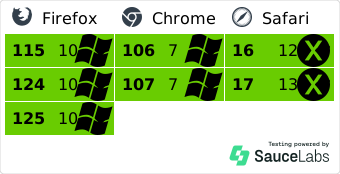
### Pre-transpiled JavaScript files (CommonJS, IIFE)
`lib/` and `browser/` directories in the npm package have JavaScript files
already transpiled, and they have been tested automatically in the following
environments:
- Node.js: Active LTS
- Firefox: last 2 versions and ESR
- Chrome: last 2 versions
- Safari: last 2 versions
## API
### `Float16Array`
`Float16Array` is similar to `TypedArray` such as `Float32Array`
([MDN](https://developer.mozilla.org/en-US/docs/Web/JavaScript/Reference/Global_Objects/Float32Array)).
```js
const array = new Float16Array([1.0, 1.1, 1.2, 1.3]);
for (const value of array) {
// 1, 1.099609375, 1.2001953125, 1.2998046875
console.log(value);
}
// Float16Array(4) [ 2, 2.19921875, 2.3984375, 2.599609375 ]
array.map((value) => value * 2);
```
### `isFloat16Array`
> [!WARNING]
> This API returns `false` for ECMAScript's native `Float16Array`
`isFloat16Array` is a utility function to check whether the value given as an
argument is an instance of `Float16Array` or not.
```js
const buffer = new ArrayBuffer(256);
// true
isFloat16Array(new Float16Array(buffer));
// false
isFloat16Array(new Float32Array(buffer));
isFloat16Array(new Uint16Array(buffer));
isFloat16Array(new DataView(buffer));
```
### `isTypedArray`
`isTypedArray` is a utility function to check whether the value given as an
argument is an instance of a type of `TypedArray` or not. Unlike
`util.types.isTypedArray` in Node.js, this returns `true` for `Float16Array`.
```js
const buffer = new ArrayBuffer(256);
// true
isTypedArray(new Float16Array(buffer));
isTypedArray(new Float32Array(buffer));
isTypedArray(new Uint16Array(buffer));
// false
isTypedArray(new DataView(buffer));
```
### `getFloat16`, `setFloat16`
`getFloat16` and `setFloat16` are similar to `DataView` methods such as
`DataView#getFloat32`
([MDN](https://developer.mozilla.org/en-US/docs/Web/JavaScript/Reference/Global_Objects/DataView/getFloat32))
and `DataView#setFloat32`
([MDN](https://developer.mozilla.org/en-US/docs/Web/JavaScript/Reference/Global_Objects/DataView/setFloat32)).
```ts
declare function getFloat16(view: DataView, byteOffset: number, littleEndian?: boolean): number;
declare function setFloat16(view: DataView, byteOffset: number, value: number, littleEndian?: boolean): void;
```
```js
const buffer = new ArrayBuffer(256);
const view = new DataView(buffer);
view.setUint16(0, 0x1234);
getFloat16(view, 0); // 0.0007572174072265625
// You can append methods to DataView instance
view.getFloat16 = (...args) => getFloat16(view, ...args);
view.setFloat16 = (...args) => setFloat16(view, ...args);
view.getFloat16(0); // 0.0007572174072265625
view.setFloat16(0, Math.PI, true);
view.getFloat16(0, true); // 3.140625
```
### `f16round` (alias: `hfround`)
`f16round` is similar to `Math.fround`
([MDN](https://developer.mozilla.org/en-US/docs/Web/JavaScript/Reference/Global_Objects/Math/fround)).
This function returns nearest half-precision float representation of a number.
```ts
declare function f16round(x: number): number;
```
```js
Math.fround(1.337); // 1.3370000123977661
f16round(1.337); // 1.3369140625
```
## `Float16Array` limitations (edge cases)
Float16Array has some limitations, because it is impossible to completely reproduce the behavior of TypedArray. Be careful when checking if it is a TypedArray or not by using ArrayBuffer.isView, and when using Web standards such as structuredClone and WebGL.
### Built-in functions
Built-in `TypedArray` objects use "internal slots" for built-in methods. Some
limitations exist because the `Proxy` object can't trap internal slots
([explanation](https://javascript.info/proxy#built-in-objects-internal-slots)).
This package isn't polyfill, in other words, it doesn't change native global
functions and static/prototype methods.
E.g. `ArrayBuffer.isView` is the butlt-in method that checks if it has the
`[[ViewedArrayBuffer]]` internal slot. It returns `false` for `Proxy` object
such as `Float16Array` instance.
```js
ArrayBuffer.isView(new Float32Array(10)); // true
ArrayBuffer.isView(new Float16Array(10)); // false
```
### The structured clone algorithm (Web Workers, IndexedDB, etc)
The structured clone algorithm copies complex JavaScript objects. It is used
internally when invoking `structuredClone()`, to transfer data between Web
Workers via `postMessage()`, storing objects with IndexedDB, or copying objects
for other APIs
([MDN](https://developer.mozilla.org/en-US/docs/Web/API/Web_Workers_API/Structured_clone_algorithm)).
It can't clone `Proxy` object such as `Float16Array` instance, you need to
convert it to `Uint16Array` or deal with `ArrayBuffer` directly.
```js
const array = new Float16Array([1.0, 1.1, 1.2]);
const cloned = structuredClone({ buffer: array.buffer });
```
### WebGL
WebGL requires `Uint16Array` for buffer or texture data whose types are
`gl.HALF_FLOAT` (WebGL 2) or `ext.HALF_FLOAT_OES` (WebGL 1 extension). Do not
apply the `Float16Array` object directly to `gl.bufferData` or `gl.texImage2D`
etc.
```js
// WebGL 2 example
const vertices = new Float16Array([
-0.5, -0.5, 0,
0.5, -0.5, 0,
0.5, 0.5, 0,
]);
const buffer = gl.createBuffer();
gl.bindBuffer(gl.ARRAY_BUFFER, buffer);
// wrap in Uint16Array
gl.bufferData(gl.ARRAY_BUFFER, new Uint16Array(vertices.buffer), gl.STATIC_DRAW);
gl.vertexAttribPointer(location, 3, gl.HALF_FLOAT, false, 0, 0);
gl.bindBuffer(gl.ARRAY_BUFFER, null);
gl.enableVertexAttribArray(location);
```
### Others
See JSDoc comments in `src/Float16Array.mjs` for details. If you don't write
hacky code, you shouldn't have any problems.
## `Float16Array` custom inspection
Provides custom inspection for Node.js and Deno, which makes the results of console.log more readable.
```js
import { Float16Array } from "@petamoriken/float16";
import { customInspect } from "@petamoriken/float16/inspect";
Float16Array.prototype[Symbol.for("nodejs.util.inspect.custom")] = customInspect;
```
```ts
import { Float16Array } from "@petamoriken/float16";
import { customInspect } from "@petamoriken/float16/inspect";
// deno-lint-ignore no-explicit-any
(Float16Array.prototype as any)[Symbol.for("nodejs.util.inspect.custom")] = customInspect;
```
## Development
Manual build and test
### Manual build
This repository uses corepack for package manager manager.
You may have to activate yarn in corepack.
```console
corepack enable yarn
```
Download devDependencies.
```console
yarn
```
Build `lib/`, `browser/` files.
```console
yarn run build
```
Build `docs/` files (for browser test).
```console
yarn run docs
```
### Test
This repository uses corepack for package manager manager.
You may have to activate yarn in corepack.
```console
corepack enable yarn
```
Download devDependencies.
```console
yarn
```
#### Node.js test
```console
NODE_ENV=test yarn build:lib
yarn test
```
#### Browser test
```console
NODE_ENV=test yarn build:browser
yarn docs
```
Access `docs/test/index.html` with browsers.
You can access current [test page](https://petamoriken.github.io/float16/test)
([power-assert version](https://petamoriken.github.io/float16/test/power)) in
`master` branch.
## License
MIT License
This software contains productions that are distributed under
[the Apache 2.0 License](http://www.apache.org/licenses/LICENSE-2.0).
Specifically, `index.d.ts` is modified from the original
[TypeScript lib files](https://github.com/microsoft/TypeScript/tree/main/src/lib).